Working from your own files and images
In this lesson we hand an assistant a screenshot of a table and get the rows back for a spreadsheet. First we try to describe the table in words and see where that goes wrong. Then we upload the picture with a brief that says what to keep exact. The check is a count of the cells that came back wrong. A second run compares two versions of a short contract, where the brief says which differences matter. By the end you have a rule for working with files and images: when to upload and when to type.
You need a chat assistant that accepts images. Most do, and the one this lesson checks its limits against takes pictures in the common formats up to 8000 by 8000 pixels each, about twenty of them in one message, and a file size limit that changes between products and over time, so check the one your product states [1]. Every response shown here is illustrative. The author wrote it to show the pattern, and your model gives a different text.
The table
Section titled “The table”Here is the material. It is a stock count from Brindlewick Instruments, the fictional company from the previous lesson, and it exists only as a picture: someone photographed the count sheet, or took a screenshot of a system you have no export from. The task is to get these six rows into a spreadsheet.
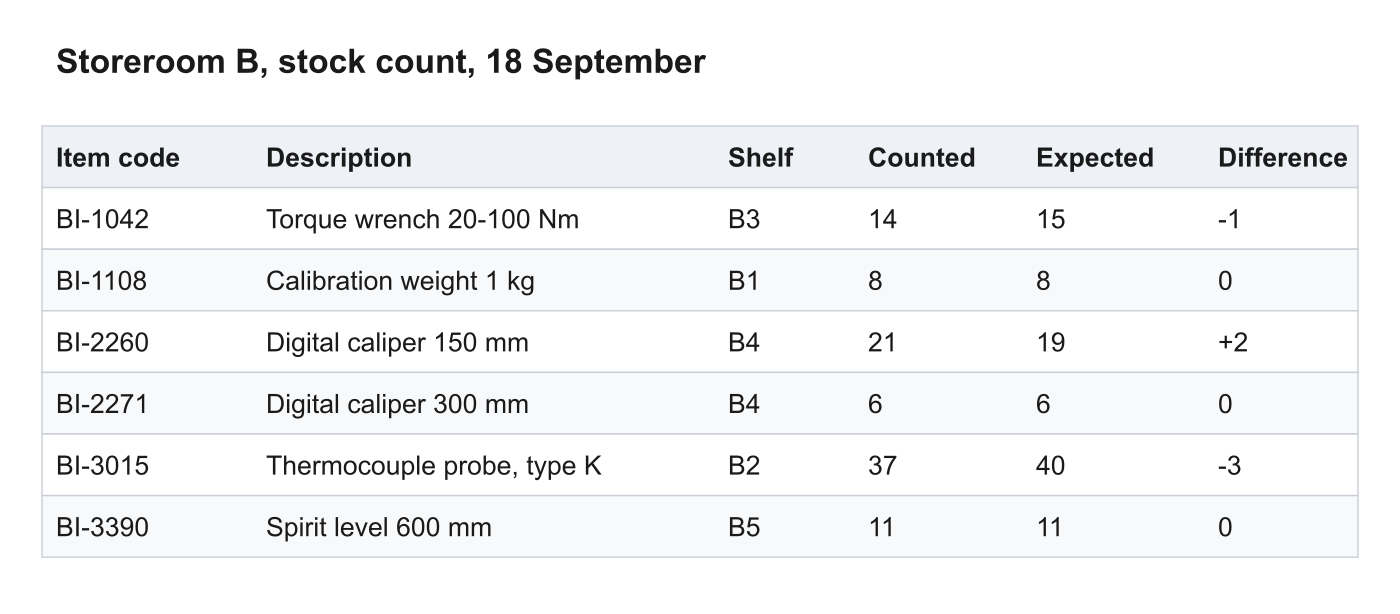
Look at it once now. Thirty-six cells, some of them one digit, some
of them a minus sign in front of a digit. You could type them, and typing
is where a -1 becomes a 1. The point of this lesson is to make the
assistant do the typing and to make the check quick.
Describe the table in words
Section titled “Describe the table in words”The first instinct is to describe what you see. Before you read on, predict what comes back when you do that. Where does the assistant get the values you leave out?
I have a stock count table with six rows. The columns are item code, description, shelf, counted, expected and difference. The items are a torque wrench, a calibration weight, two digital calipers, a thermocouple probe and a spirit level. The item codes start with BI and a dash and a four-digit number. Can you give me the rows to paste into a spreadsheet?
Here is the table as tab-separated rows. I have filled in the codes and numbers as placeholders where you did not give them, so replace those with the real values.
Item code Description Shelf Counted Expected DifferenceBI-0001 Torque wrench B1 10 10 0BI-0002 Calibration weight B1 5 5 0BI-0003 Digital caliper B2 12 12 0BI-0004 Digital caliper B2 12 12 0BI-0005 Thermocouple probe B3 8 8 0BI-0006 Spirit level B3 4 4 0The response says so itself, and it is still no use. The numbers are made up, because the prompt gave none, and the two calipers are indistinguishable because the prompt did not say how they differ. You would now type thirty numbers into the assistant’s placeholders, which is the work you wanted to hand over. A description is a lossy copy of the picture, and the loss is in the exact values, which is the one part of the task that matters.
Upload the screenshot
Section titled “Upload the screenshot”Now attach the picture. Save the screenshot from this page to your computer, open a fresh chat, add the file to the message, and write the ask under it. The brief has the parts you used for the expense guideline in the previous lesson. The goal is rows for a spreadsheet. The context is the attached file, named as the only source. The limits say what to keep exact and what to leave out. The done-criterion is one you can check against the picture.
[stock-count.png attached]
Attached is a screenshot of a stock count. Give me every row as tab-separated values that I can paste into a spreadsheet, with the header row first and the rows in the same order as the picture. Keep the item codes and the numbers exactly as shown, including the sign. Do not add a total or any row that is not in the picture. Where a cell is unreadable, write a question mark instead of guessing.
Item code Description Shelf Counted Expected DifferenceBI-1042 Torque wrench 20-100 Nm B3 14 15 -1BI-1108 Calibration weight 1 kg B1 8 8 0BI-2260 Digital caliper 150 mm B4 21 19 +2BI-2271 Digital caliper 300 mm B4 6 6 0BI-3015 Thermocouple probe, type K B2 37 40 -3BI-3390 Spirit level 600 mm B5 11 11 0Paste the rows into a spreadsheet and put the picture next to it. Go
through the cells one at a time and count the ones that differ from the
picture. On a clear screenshot like this one the count is zero or one,
and the cells that go wrong are the ones a person mistypes too: a sign
dropped from a negative number, or a 1 read as a 7. The vendor’s own
documentation says that the model reads small, blurry or rotated text
badly and that its counts of objects are approximate. It recommends text
that is legible in the picture. A crop that makes the text larger should
still show the context around it, such as the header row [1]. The check is what tells you which kind of picture you have.
The upload changed the task. You wrote one sentence about the file and three about what to keep exact, and the assistant did the thirty-six cells. The same brief works for a photo of a whiteboard, a PDF price list, a spreadsheet export, or a scanned form. Name the attachment as the source and say what must be copied exactly. Give the model a way to say “I can’t read this”, so that it doesn’t fill the gap.
Which ask gets the table?
Section titled “Which ask gets the table?”The lesson turns a screenshot of a six-row stock count table into rows for a spreadsheet, and the learner can attach the screenshot to the chat.
You have the screenshot of the stock count and a chat open. Which ask gets you rows you can paste and check in a minute?
Which ask gives the model the values, and which asks give it room to invent them?
Compare two versions of a contract
Section titled “Compare two versions of a contract”Here is a second use of the same move. A short service agreement has come back from the other side with changes, and you want to know what changed. The versions are below, and each is short on purpose so that you can check the answer. In your own work they would be two files, and you attach both.
Service agreement, calibration services (version 1)
- Brindlewick Instruments calibrates the Client’s measuring equipment listed in Schedule A once every twelve months.
- The fee is 1,200 euros per visit, invoiced after each visit and payable within 30 days.
- Either party may end this agreement with 60 days’ written notice.
- Brindlewick repeats a faulty calibration free of charge when the Client reports it within 14 days of the visit.
- Brindlewick keeps the calibration records for five years and provides copies on request.
- Brindlewick may not subcontract the work without the Client’s written consent.
Service agreement, calibration services (version 2)
- Brindlewick Instruments calibrates the Client’s measuring equipment listed in Schedule A once a year.
- The fee is 1,350 euros per visit, invoiced after each visit and payable within 30 days.
- Either party may end this agreement with 30 days’ written notice.
- Brindlewick repeats a faulty calibration without charge when the Client reports it within 14 days of the visit.
- Brindlewick keeps the calibration records for five years and provides copies on request.
- Brindlewick may subcontract the work to a certified laboratory and remains responsible for it.
“Compare these two” gives you a list in which a fee increase and a changed turn of phrase sit side by side with the same weight. The brief says which differences matter and what to do with the rest.
[contract-v1.txt and contract-v2.txt attached]
Attached are two versions of a service agreement. List every difference that changes an amount, a period, a deadline or an obligation. For each one, quote the sentence from both versions. Rewording that keeps the meaning goes in one line at the end, and if a clause is unchanged, do not mention it.
- Fee. Version 1: “The fee is 1,200 euros per visit”. Version 2: “The fee is 1,350 euros per visit”.
- Notice period. Version 1: “with 60 days’ written notice”. Version 2: “with 30 days’ written notice”.
- Subcontracting. Version 1: “Brindlewick may not subcontract the work without the Client’s written consent.” Version 2: “Brindlewick may subcontract the work to a certified laboratory and remains responsible for it.” The Client’s consent is no longer needed.
Rewording only: clause 1 says “once a year” instead of “once every twelve months”, and clause 4 says “without charge” instead of “free of charge”.
Check it against the two texts. Each of the three items quotes both versions, so the check is finding two sentences, and the reworded clauses are named and set aside rather than mixed in. The brief did that. It named the kinds of change that matter (amount, period, deadline, obligation), asked for the quote behind each, and gave the rewording a place to go.
Which differences does the brief ask for?
Section titled “Which differences does the brief ask for?”The lesson compares two versions of a short fictional service agreement with a brief that asks for every change to an amount, a period, a deadline or an obligation, and asks for rewording to be listed separately.
For each change, ask: does one party owe, pay, wait or get something different, or is it the same rule in other words?
What an upload discloses
Section titled “What an upload discloses”An attachment goes to the same place as pasted text, under the same terms, and the model reads all of it. The difference is that you read pasted text as you paste it, and you rarely read a file before you attach it. In the lesson on redacting before you paste you read a document with the task in mind and split it into what the task uses and what says who is involved. Do the same with a file, and where a file holds both, make a copy that holds only the first part: crop the screenshot, or export the one sheet.
Which file goes in the brief?
Section titled “Which file goes in the brief?”A learner wants an assistant to turn one column of two hundred numbers from a team spreadsheet into a chart. The spreadsheet also holds columns with the team members' names and salaries.
You want a chart of the daily totals column from the team’s spreadsheet, two hundred rows of it. The sheet also has a column of names and a column of salaries. What do you attach?
What does the chart need from the sheet, and what else is in the sheet?
The brief for an upload
Section titled “The brief for an upload”A learner attaches a screenshot of a table of stock counts to a chat and writes the brief that asks for the rows.
Which two lines belong in the brief?
Which lines say where the values come from and what happens with a cell the model can't read?
Attach, type or copy out?
Section titled “Attach, type or copy out?”The lesson attaches a file when the exact values matter, and says that an attachment discloses its whole content, so the part the task needs is copied out first when the rest must not go in.
Match each task to how you give the assistant the material.
Do exact values matter, and is there anything in the file that the task doesn't need?
The rows are in the sheet
Section titled “The rows are in the sheet”An assistant turned an attached screenshot of a six-row stock count into rows for a spreadsheet. The rows are pasted, and there is no question mark in them.
The six rows are in the spreadsheet. What do you do before you use them?
Where do the errors in a transcription show up, if they are there?
When to upload and when to type
Section titled “When to upload and when to type”Upload when the material is long, structured or visual: a table, a diagram, a photo of a whiteboard, a document with numbering you want kept. Describing it loses the exact values, and the exact values are the task. Type when the material is one or two sentences, or when the file holds things the task doesn’t need and you can’t cut them out in a minute.
Either way the brief is the one you wrote for the expense guideline in the previous lesson, with the attachment in place of the pasted text. Name the file as the source, say which values must be copied exactly, give the model a way to say it can’t read something, and check the result against the file. A read of a picture is a transcription, and a transcription error is silent until you look.
Exercise
Save the stock count screenshot from this page, open a fresh chat, attach it, and send the brief from the “Upload the screenshot” section. Paste the rows into a spreadsheet and compare them with the picture, cell by cell, and write down the number of cells that differ and what each one says. It takes about five minutes and produces one number and at most a few lines. Doing it once by hand shows you what kind of error a picture read makes, so you know what to check for next time. A good result is a count you can name, with a line for each wrong cell, and zero is a fine count. Which of the wrong cells, if any, would you have got wrong yourself if you had typed the table?
Stretch: Shrink the screenshot to half its width in any image editor, run the same brief on the smaller copy, and see whether the count of wrong cells changes.
Recap
- A description of a table is a lossy copy of it, and the loss is in the exact values. Attach the picture or the file, and let the model do the typing.
- The brief for an upload has the same four parts as any other. Name the attachment as the only source, say which values must be copied exactly, and give the model a way to say it can’t read a cell.
- Check the result against the file, cell by cell. A model reads small, blurry or rotated text badly, and a transcription error is silent until you look [1].
- When comparing two files, say which kinds of difference matter and where the rest should go, and ask for the quote from both versions behind each one.
- An attachment discloses its whole content, the same as pasted text. Crop or copy out the part the task needs before you attach.
You can now
- Writes a brief with goal, context, limits and done-criteria
References
Section titled “References”- Anthropic. Vision. Claude Platform documentation. Reference.
Claude docs vision