
Diagramming Models
Draw the agreed facts of the domain model as a tidy diagram.
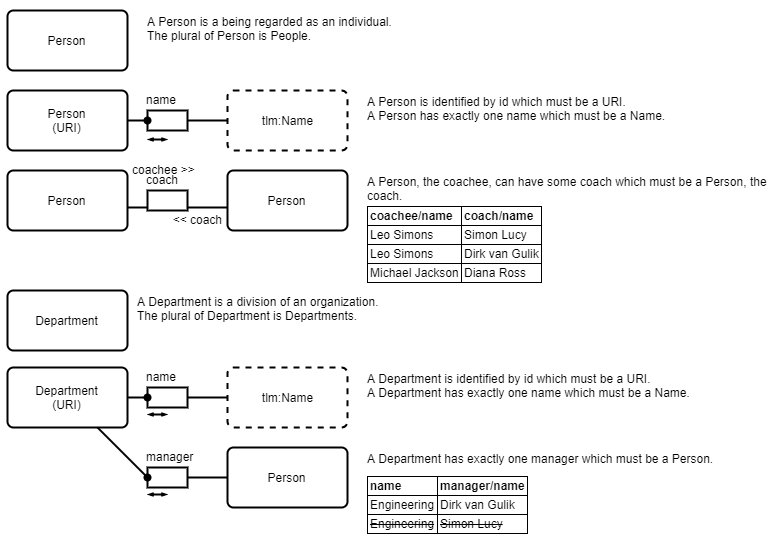
Once you have talked through the facts on the whiteboard (stage 1), stage 2 is about producing cleaner diagrams to communicate and review the model. You have two good options.
Generate diagrams from a LinkML schema
Section titled “Generate diagrams from a LinkML schema”If you are going to capture the model as code anyway, write the LinkML schema first (see models-as-code) and let it generate the diagram for you:
gen-erdiagram hr.yamlproduces a Mermaid ER diagram.gen-plantuml hr.yamlproduces a PlantUML class diagram.
Generated diagrams never drift from the model, because the model is their source.
Draw diagrams by hand in draw.io
Section titled “Draw diagrams by hand in draw.io”If you are not ready to write a schema, draw the diagram by hand in draw.io using generic shapes — circles or boxes for the types, lines for the facts between them, crow’s feet for one-to-many links. See the guide on using draw.io.
Keep the notation simple. Formal fact-based notation (such as full ORM diagrams) adds precision but raises the barrier for contributors who are not trained in it, which works against the whole point of getting the domain experts to check the model.
Why not UML class diagrams or ER?
Section titled “Why not UML class diagrams or ER?”See Fact-Based Modeling for a description of the advantages of fact-oriented modeling over more well-known approaches such as UML class diagrams.